

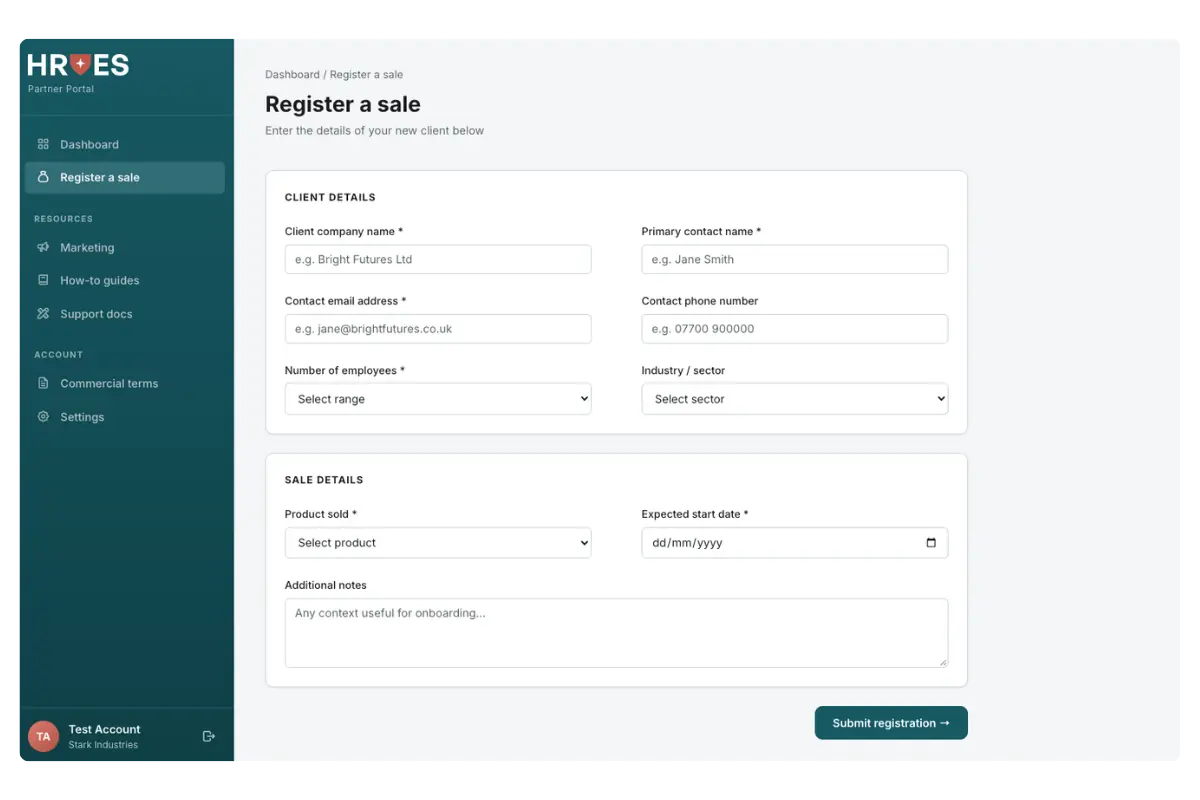
You’ve had the conversation, the client is ready, and now you want to get them started. Whether you’re a white-label partner or a referral partner in the HRoes HR software partner programme, you can refer clients through our partner portal using one short form. It takes a few minutes, with no spreadsheets, no back-and-forth emails and no chasing.
What’s in the HRoes partner portal?
The Partner Portal is your home for working with HRoes. Alongside registering sales, you’ll find:
- Dashboard: a quick view of your account
- Marketing: ready-made resources to help you promote and sell
- How-to guides: practical guidance on the platform
- Support docs: answers to common client questions
- Commercial terms: your partner agreement and pricing in one place
Why refer clients through the partner portal?
- It makes earning more revenue even easier. Less time on admin means more time selling. White-label partners set their own client pricing on top of the wholesale rate, and referral partners earn from every client they introduce, so each new client adds revenue to your business.
- It’s quick. One form, a handful of fields, and you’re done.
- Nothing gets lost. Every registration goes straight to the HRoes team, so there’s no risk of details slipping through an inbox.
- Your clients get started sooner. The faster a sale is registered, the faster onboarding can begin.
- Everything sits together. Registrations, free sales and marketing resources and commercial terms all live in one place.
How to refer a client in three simple steps
Step 1: Open “Register a sale”
Log in to the Partner Portal and select Register a sale from the menu. Everything you need is on a single page.
Step 2: Add your client’s details
Enter the basics about your client:
- Company name
- Primary contact name and email address
- Contact phone number (optional)
- Number of employees
- Industry or sector (optional)
Step 3: Add the sale details and submit
Choose the product you’ve sold and the expected start date. Use the notes box for anything that will help with onboarding, then click Submit registration. That’s it. Our team takes it from there.
What to have ready before you start
A little preparation makes registration even quicker. Before you log in, make sure you have:
- Your client’s main contact and their email address
- An idea of their headcount
- The product they’ve chosen and when they’d like to start
Tips for a smooth handover
- Use the notes box. A line about your client’s priorities, deadlines or HR challenges helps the onboarding team get off to the best start.
- Register as soon as the client says yes. The sooner a sale is registered, the sooner setup can begin.
- Let your client know what’s next. A quick email telling them to expect contact about onboarding keeps momentum going.
How long does it take to register a client?
Just a few minutes. It’s one short form with a handful of required fields.
What happens after I submit a registration?
The HRoes team picks it up and begins the onboarding process with your client. You’ll find more detail in the Partner Portal’s guidance on what happens after you register a sale.
Can I add more products for an existing client?
Yes. Speak to your partner manager, who can help you add products or services to an existing client.
Where can I find resources to help me sell?
In the Marketing section of the Partner Portal, alongside how-to guides and support documents.
Not a partner yet?
The partner portal, along with free sales and marketing resources, is available to every HRoes white-label and referral partner. Get in touch to learn more: book a partner programme intro call.